Don'tFallfortheScare:ProtectingYourBusinessfromFakeVirusAlertScams
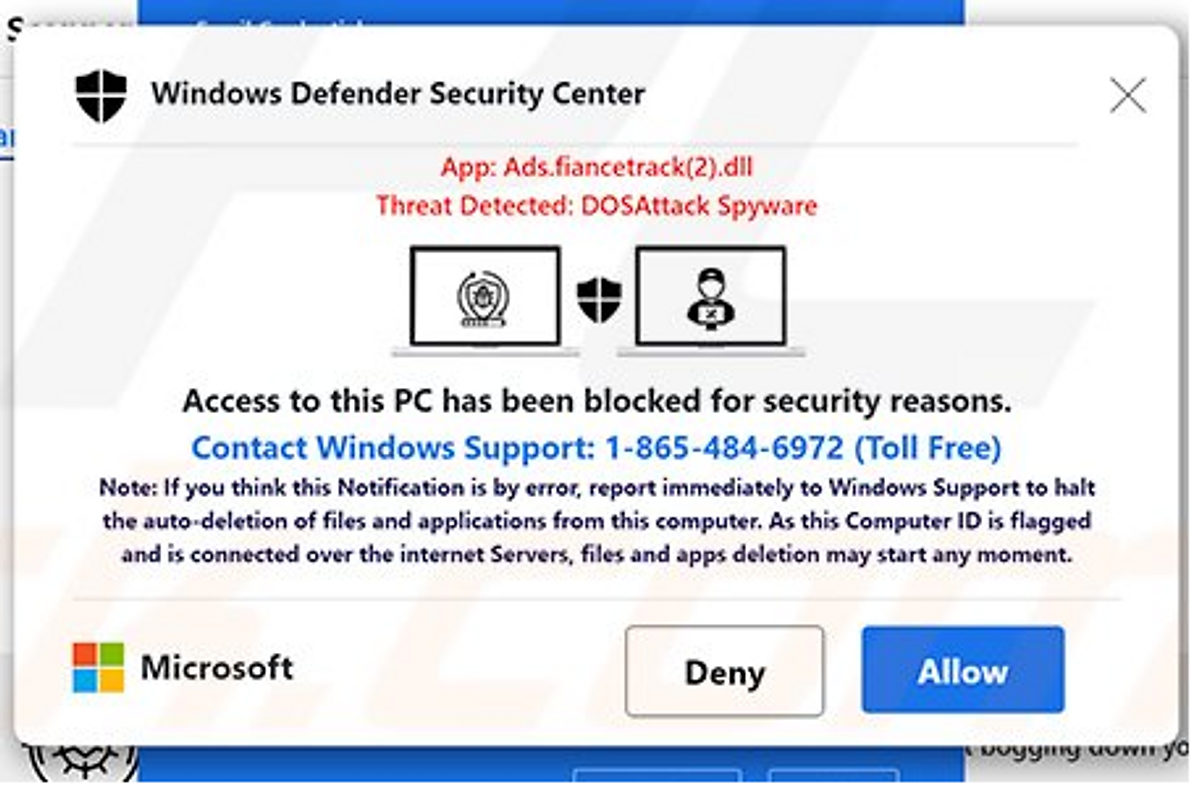
Understanding the Anatomy of a Fake Virus Alert Scam
As a small business owner or manager, you're likely juggling a million things at once. From managing your team and serving your customers to keeping a close eye on the bottom line, your plate is full. Fake virus alerts are a form of social engineering, a psychological manipulation technique that exploits human emotions, particularly fear and urgency.
The Unexpected Encounter
The alert typically appears on a legitimate or malicious website and mimics the design of security software or your operating system. Common alarming messages include claims that your computer is infected with a dangerous virus, or that immediate action is required because your system is at risk. These pop-ups are often accompanied by flashing graphics, loud noises, and a sense of urgency.
Playing on Fear and Urgency
The scam uses deliberately alarming terminology and pressures users toward immediate action. It is designed to bypass logical reasoning and exploit impulsive behavior, and it discourages users from consulting IT support before acting.
Offering a Solution: The Trap Is Sprung
Two things usually happen next. The alert prompts you to download malicious software capable of stealing information, deploying ransomware, or granting remote access. Or it directs you toward fake antivirus services, asking you to call a number or visit a website to purchase useless software, exposing your personal and financial information in the process.
Social Engineering at Its Finest
These scams exploit user anxieties about security and mimic familiar interfaces to build false trust. Less tech-savvy individuals are targeted most often.
Why Small Businesses Are Prime Targets for Scareware
- They hold sensitive customer data, financial records, and proprietary information.
- Attackers perceive a likelihood of larger financial payouts than with individuals.
- Technical expertise varies widely among staff.
- IT budgets are limited and there are fewer dedicated cybersecurity personnel.
- Disruption can be devastating, with significant downtime and reputational consequences.
The Real Dangers of Falling for Fake Virus Alerts
- Malware infections: Data theft, system crashes, data corruption, and the introduction of ransomware or spyware.
- Financial losses: Direct payments for fake software, plus recovery, repair, and legal costs.
- Data breaches and compliance issues: Legal repercussions, especially where personally identifiable information or regulated industries such as HIPAA and GDPR are involved.
- Reputational damage: Loss of customer trust and business.
- Loss of productivity and downtime: Operational disruption and missed opportunities.
- Remote access for attackers: System control, data theft, and misuse of your infrastructure.
Practical Steps to Protect Your Business
Educate and Train Your Employees
Your people are your first line of defense. Conduct regular cybersecurity awareness training that emphasizes the dangers of scareware and social engineering tactics. Teach staff to recognize the red flags: suspicious pop-ups, unusual website behavior, and the common characteristics of fake alerts such as aggressive language, urgent demands, and unfamiliar branding. Reinforce safe browsing practices - avoid suspicious websites, exercise caution with unfamiliar links, and understand the risks of unverified downloads. Establish clear reporting procedures and encourage employees to report anything suspicious, even as a precaution.
Implement Robust Technical Safeguards
- Install reputable antivirus and anti-malware software with automatic updates and regular scans.
- Enable browser pop-up blockers and advanced security extensions.
- Keep operating systems, browsers, and software current with security patches.
- Deploy properly configured firewalls.
- Implement web filtering tools that block known malicious sites.
Establish Clear Policies and Procedures
Set software installation policies so that only approved, vetted software is permitted. Require personal devices covered by a BYOD policy to meet security standards, including current antivirus. Document an incident response plan covering system isolation, incident reporting, and recovery.
Promote a Culture of Security Awareness
Reinforce good practices through regular communications and team meetings. Model compliance as leadership, and foster open communication so employees can raise concerns without fear of reprimand.
Know What to Do If You Encounter a Fake Alert
- Do not click on anything within the pop-up.
- Use the task manager to force-quit the browser - Ctrl+Shift+Esc on Windows, Command+Option+Esc on macOS.
- Never enter personal or financial information.
- Do not call any number provided in the alert.
- Run a full system scan with legitimate antivirus software.
- Contact your internal IT team or external provider for assistance.
- Report the incident to the FTC at ReportFraud.ftc.gov or to the IC3.
Staying Vigilant in an Evolving Threat Landscape
The cost of prevention is always significantly less than the potential financial and reputational damage caused by a successful cyberattack. Invest in the right tools, training, and policies, and take a proactive rather than reactive approach to protecting your business.